
What is an Invoice?
Understanding Invoices and the Importance of an online Invoice Generator Tool:
An invoice is a billing document created by a company and sent to a client to the products or services provided and requests payment for them.It can be created on paper or digitally and contains key information such as the items delivered, their prices, and the payment deadline.
In the past, invoices were often written manually or prepared in spreadsheets. Today, most companies prefer using an online invoice generator tool to create invoices quickly and accurately. These tools offer businesses to make professional invoices in seconds while reducing errors and saving time.
Why Invoicing Matters for Businesses:
Invoicing is a critical part of running any business because it acts as an official request for payment. Without systematic invoicing, it becomes difficult to manage cash flow and track financial transactions.
A well-organized invoicing system helps businesses:
- Record sales and payments clearly
- Maintain accurate financial records
- Calculate taxes correctly
- Monitor outstanding payments
- Manage overall cash flow
Using a reliable online invoice generator simplifies the entire billing process and ensures that invoices are created in a professional and consistent format.
Elements Every Invoice Should Include:
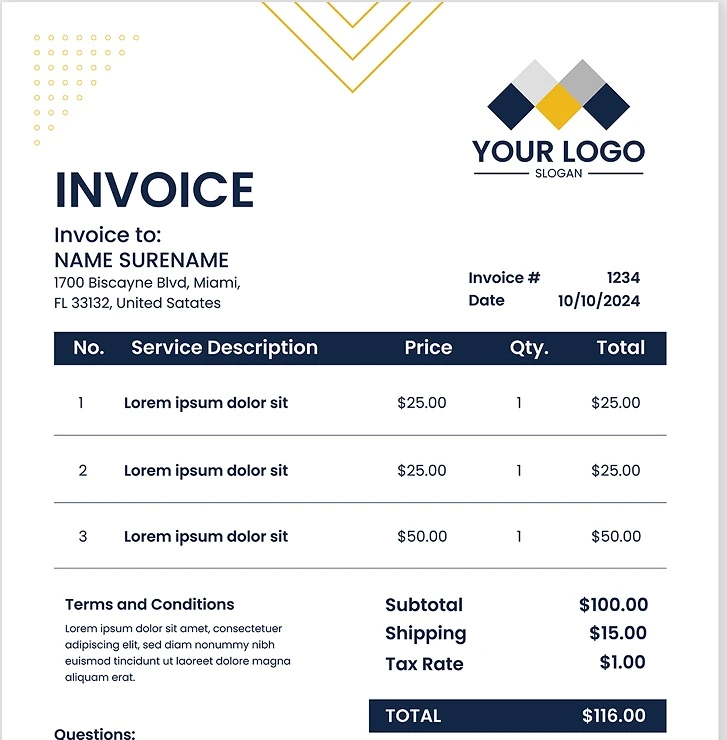
A clear and well-structured invoice reduces confusion and encourages customers to pay on time. When using a modern online bill generator or online invoice creator, these elements are usually added automatically.
1. Invoice Number
Unique identification number is allocated to each invoice. This number helps businesses track transactions, organize records, and avoid confusion between multiple invoices.
2. Invoice Date
It shows date of invoice creation. This information is important for accounting purposes and also helps determine the payment deadline.
3. Payment Terms
Payment terms tell the client when and how the payment should be made. For example, businesses may use terms such as Net 15, Net 30, or Due on Receipt.
4. Description of Products or Services
The invoice should clearly list every item or service provided. Each entry usually includes:
- Item description
- Quantity
- Unit price
- Total cost
This transparency helps prevent misunderstandings between the business and the customer.
5. Total Amount Payable
A professional invoice must display the final amount due. This may include:
- Subtotal
- Taxes (if applicable)
- Discounts
- Final payable amount
6. Business Contact Information
Your invoice should include your business details so clients can easily contact you if they have questions. Important information includes:
- Business name
- Address
- Email address
- Phone number
Common Types of Invoices
Businesses use different types of invoices depending on the nature of the transaction.
1. Interim Invoice
For large or long-term projects interim invoice is normally used. Instead of waiting until the project is completed, businesses send invoices in stages as the work progresses.
2. Recurring Invoice
Recurring invoices are used when payments need to be collected regularly, such as monthly subscriptions or ongoing services.
3. Commercial Invoice
For international trade this type of invoice is used. It contains shipping details, product descriptions, and information required by customs authorities.
4. Timesheet Invoice
A timesheet invoice is typically used by freelancers and consultants who charge clients based on the number of hours worked.Types of Invoices to Familiarize Yourself With:
How to Create an Invoice Using an online Invoice Generator:
Preparing invoices manually can take time and increase the chances of mistakes. Using an online invoice generator makes the process faster and more accurate.
Follow these simple steps to create a professional invoice.
Step 1: Select an Invoice Template
Start by choosing a clean and professional template from your invoice generator tool. Templates help maintain a consistent and organized layout.
Step 2: Add Business and Client Information
Enter your business details along with the customer’s contact information. This ensures the invoice clearly identifies both parties.
Step 3: Enter Products or Services
List all items or services provided, that includes descriptions, quantities, unit prices, and totals for each item of services.
Step 4: Calculate Totals Automatically
Most online invoice generators automatically calculate totals, including taxes, discounts, and the final payable amount.
Step 5: Define Payment Terms
Specify the payment deadline and preferred payment methods.
Step 6: Review and Send the Invoice
Before sending the invoice, review all details to ensure accuracy. Once verified, you can download the invoice as or send it to your customer directly via email.
Step 7: Save Your Records
Always store copies of your invoices for accounting, reporting, and tax purposes.
Advantages of Using a Digital Invoice Generator:
Switching from manual invoicing to a digital system offers several benefits for businesses.
Time Efficiency:
Automated calculations and templates help generate invoices in seconds.
Reduced Errors:
Automated systems minimize mistakes in calculations or formatting.
Professional Appearance:
Digital invoices have a polished layout that enhances your brand image.
Payment Tracking:
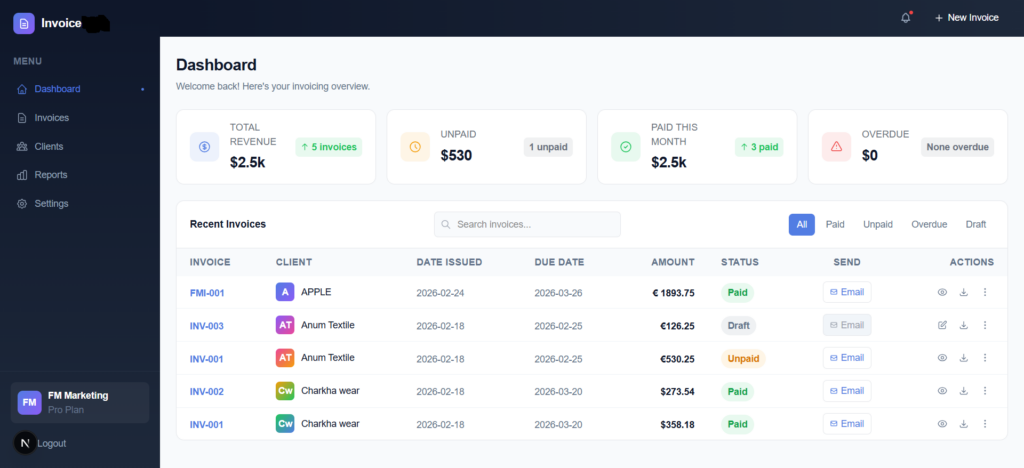
Invoice tools help monitor which invoices are paid, pending, or overdue.
Better Financial Management:
Businesses can track income and manage cash flow more effectively.
Faster Payments:
Many invoice tools allow customers to pay directly through online payment options.
Whether you are an individual freelancer, business owner, or startup, using a bill creator or online invoice generator helps simplify financial management and improve efficiency.
In whatever business you are, modern invoice generator tool will definitely helps you stay organized and get paid faster.
Final Thoughts: Why Businesses Should Use an Online Invoice Generator:
Invoices play an essential role in business operations. They ensure accurate records of financials and make it easier to collect payments from customers.
Instead of spending time creating invoices manually, businesses can rely on an online invoice generator to automate the process. These tools help produce professional invoices quickly while improving accuracy and organization.
Adopting a digital invoicing solution can help businesses save time, maintain better financial control, and receive payments faster.
Frequently asked questions:
Q – 1 What does an invoice generator tool do?
Ans – An invoice generator tool is a web-based application that allows businesses and freelancers to quickly prepare professional invoices, organize billing information, and send payment requests to clients in a structured format.
Q – 2 Do invoice generators cost money?
Ans – Many platforms provide free invoice creation with essential features, while premium versions usually include advanced options such as recurring billing, payment tracking, or financial reporting.
Q – 3 Can I personalize the invoices I create?
Ans – Yes. Most modern invoice tools allow you to customize the layout of your invoice, add your company logo, edit business details, and adjust payment instructions to match your brand identity.
Q – 4 Is sending invoices through the internet secure?
Ans – Reliable invoicing platforms use encrypted connections and secure servers to protect sensitive information, making online invoicing a safe option for businesses..