
How to Create Invoices ?
How to Create Invoices Professionally?(Step-by-Step Guide):
Invoices are essential documents in business transactions because they confirm that a product was sold or a service was delivered. They clearly show the amount that the customer needs to pay, along with payment instructions and deadlines.
A properly structured invoice helps companies maintain organized financial records and ensures that payments are collected on time. Without an effective invoicing system, businesses may struggle with delayed payments, poor cash flow management, or disputes with clients.
Freelancers, startups, and small companies depend heavily on invoices to request payments and track their earnings. For freelancers managing multiple projects, invoices make it easier to organize work and maintain professional communication with clients. Small businesses also rely on them to monitor outstanding payments and maintain accurate accounting records.Many beginners search online to understand how to create invoice documents that look professional and include all important billing details.
Today, creating invoices has become much easier thanks to online invoice generators, which allow users to produce professional invoices quickly using ready-made templates and automated calculations.
What Is a Professional Invoice?
A professional invoice is a structured billing document sent to a client after delivering goods or completing services. It provides detailed information about the transaction and informs the customer about the payment they need to make.
A well-designed invoice typically includes:
- Business name and contact information
- Client details
- Description of services or products
- Itemized pricing and subtotal
- Applicable taxes and total amount due
- Payment deadline and payment methods
Besides requesting payment, invoices also act as an important record for accounting and legal purposes. A properly formatted invoice improves credibility and helps businesses maintain a professional image.
Essential Elements Every Invoice Should Contain:
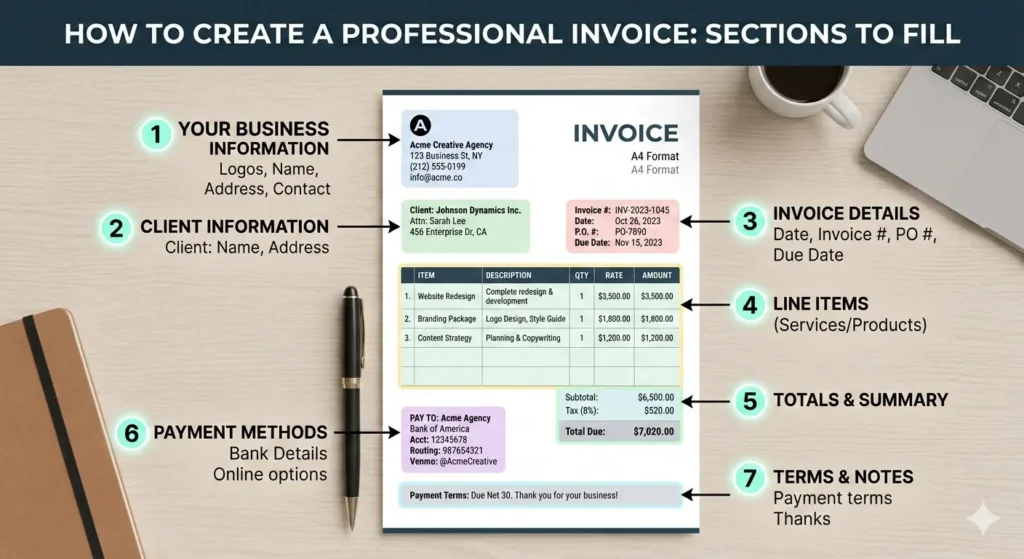
Learning how to create invoice properly helps businesses maintain accurate financial records and request payments from clients clearly.To avoid confusion and ensure smooth payment processing, every invoice should contain the following components.
Business Information:-
The invoice should display the company’s name, address, and contact information so that client knows who issued the invoice.
Client Details:-
Customer information such as name, company name, and contact details must be included to ensure correct billing.
Invoice Number:-
Each invoice should have a unique number that helps businesses track transactions and organize financial records.
Invoice Date and Due Date:-
it shows when the invoice was created, while the due date tells the client when the payment should be completed.
Description of Products or Services:-
A clear breakdown of items or services delivered should be included to prevent misunderstandings.
Pricing Details:-
Each item should display quantity, unit price, and the total cost for item or service.
Taxes and Final Amount:-
If taxes apply, they should be calculated and added to the invoice along with the final payable amount.
Payment Terms:-
Payment instructions should mention accepted payment methods and the payment deadline.
Step-by-Step Process to Create an Invoice:
If you are a freelance individual or small business owner, understanding how to create invoice correctly can help you avoid payment delays. Many beginners search for guidance on preparing invoices that look professional and contain the correct information. Using a structured approach or an online invoice generator can make this process simple.
Step 1 – Enter Business Details
Start by adding your business name, logo, and contact information so the invoice clearly identifies the sender.
Step 2 – Add Customer Information
Provide the client’s name, address, and communication details to ensure the invoice reaches the correct recipient.
Step 3 – Add Products or Services
List the goods or services provided along with quantities and prices to give a clear overview of the transaction.
Step 4 – Include Taxes or Discounts
Apply any required taxes or promotional discounts so the final amount reflects the correct total.
Step 5 – Define Payment Terms
Specify the payment deadline and the payment methods your business accepts.
Step 6 – Review and Send the Invoice
Before sending the invoice, review all information carefully to ensure accuracy. Once confirmed, download the invoice as a PDF or share it with the client digitally.
When preparing invoices, avoid these common errors:
- Forgetting to include an invoice number
- Incorrect tax calculations
- Missing payment terms
- Not mentioning a due date
- Providing unclear service descriptions
Avoiding these mistakes helps prevent payment delays and keeps financial records accurate.
Invoice Templates vs Online Invoice Generators:
Businesses can create invoices using either manual templates or automated invoicing tools. However, both option had their own pros and cons.
Manual Templates
Templates created in programs like Word or Excel allow users to manually fill in all invoice details. While this option works for occasional invoicing, it can become time-consuming when invoices need to be created regularly.
Manual invoicing also increases the risk of calculation errors or formatting inconsistencies.
Online Invoice Generators
Online invoice generators simplify the process by automating calculations and providing ready-to-use templates. Users can create invoices quickly, customize them with branding elements, and download them as professional PDF documents.
These tools also save time by storing customer information and frequently used items for future invoices.
For most freelancers and small businesses, using an online invoice generator is usually the more efficient and reliable option..
Frequently Asked Questions:
Do invoices need to be registered?
Generally, invoices do not require registration. However, they must include accurate details and comply with local tax regulations.
Can I create an invoice without a registered company?
Yes. Freelancers and independent professionals can issue invoices using their personal name and contact information.Once you learn how to create invoice, using an online invoice generator can make the process faster and more efficient.
How long should invoices be stored?
Businesses typically keep invoices for five to seven years, depending on the accounting and tax regulations of their country.
Can invoices be sent in PDF format?
Yes. Many invoicing tools allow users to download invoices as PDF files and send them directly to clients via email.